Nhako
BM Enquire
kimzam's GitHub profile picture

hello, I'm

Hi, I'm kimzam

kimzam30 on GitHub. A developer in Malaysia building Nhako: things that run on your own device.

About kimzam

Developer in Malaysia building the Nhako products: things that run on your own device. TypeScript, Next.js and Supabase on top of Docker, Linux and self-hosted infrastructure.

Nhako is short for Nera + Hakim Corporation. Say it nako, the h is silent. Everything below is public on GitHub, and every claim links to the project that shows it.

What I work with

35 skills in six beds. Each names the projects that prove it; tap one to jump to it.

Languages 8

Frontend and the web platform 8

Backend and data 3

AI on your own hardware 3

Infrastructure and self-hosting 7

Quality, security and craft 6

Every tool in the box

The complete stack across all 13 projects. Tap any tool to see the projects that use it.

Languages

Frontend and the browser

Backend and data

AI on your own hardware

Infrastructure and self-hosting

Platforms and shipping

Quality and craft

Every project, in full

All 13 public repositories, newest product first, with the whole stack and the write-up.

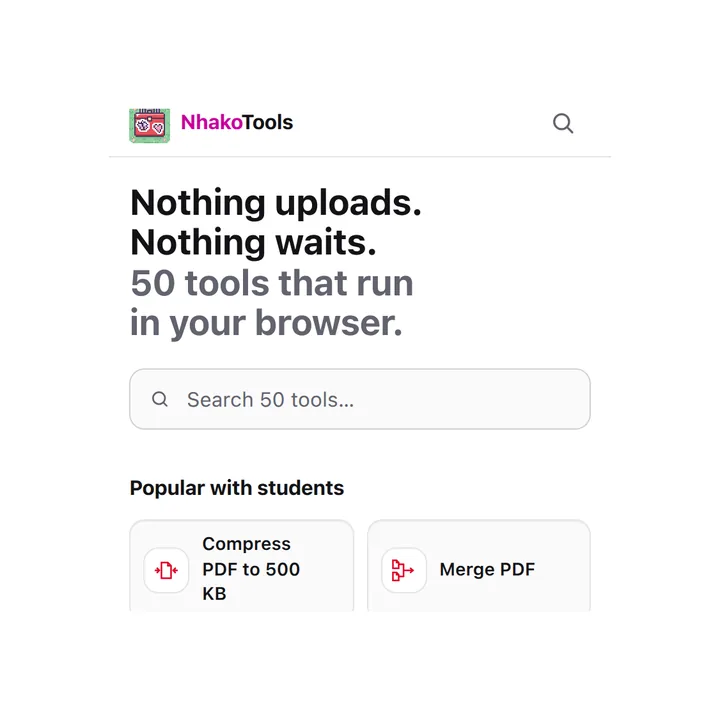
  • The Nhako Tools home page: nothing uploads, nothing waits, 50 tools that run in your browser
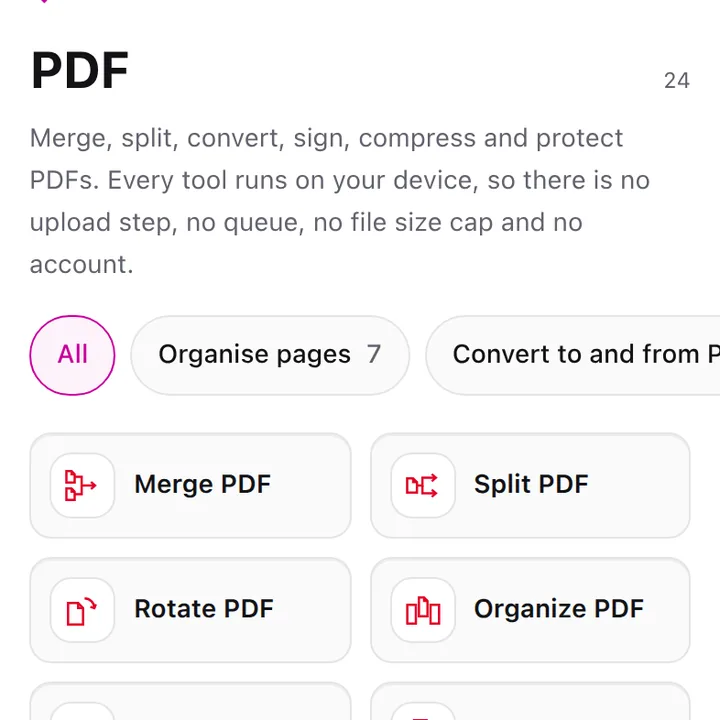
  • The PDF shelf in Nhako Tools: merge, split, rotate, organise and more
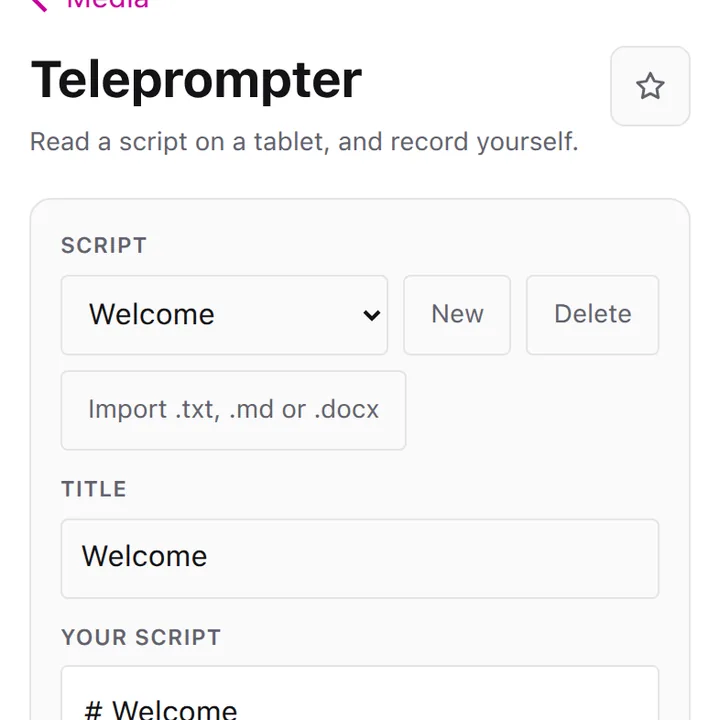
  • The Nhako Tools teleprompter, with a script ready to read

LiveWeb app, 50 tools

Nhako Tools

github.com/kimzam30/Nhako-tools

Fifty PDF, image, media, calculator and developer tools that run in your browser. Nothing uploads, so nothing waits.

  • Every page in English and Bahasa Melayu
  • Installs as an app and works offline
  • The home page ships 0 KB of site JavaScript
Stack
Astro 5 (static), Preact islands, TypeScript, Tailwind CSS v4
Engines
pdf-lib, pdf.js, ffmpeg.wasm, transformers.js (Whisper), LibreOffice in WebAssembly
Languages
English and Bahasa Melayu
Hosting
Vercel
Started
Last push
License
MIT

Full stack 22

Read the full write-up

Why it exists

Most online tools upload your file, process it on a server and send it back. That means an upload wait, a queue, a size cap, usually a daily limit, and often an account before you can download the result.

None of that is necessary any more, because browsers can do this work directly. So there is no upload step here. That makes the tools faster, and it happens to make them private, because a file that is never sent anywhere cannot leak. You do not have to take that on trust: open your network tab and run any tool, and your file never appears in it.

What you get

  • PDF: merge, split, organise, compress (including to a target size like 500 KB), OCR, sign, watermark, protect, and convert to and from Word, PowerPoint and images.
  • Image: compress to a target size, passport photo maker, remove background, crop, convert.
  • Media: compress video, extract audio, audio to text, and a full-screen teleprompter with a phone remote.
  • Calculators: CGPA, and Malaysian take-home pay.
  • Developer tools, plus search across all 50 in either language (Ctrl K), favourites kept in your browser, and a Malaysia page for the jobs local forms ask for.

How it works

One registry file is the single source of truth: routes, page metadata, the home grid, the command palette and the sitemap are all derived from it, and Astro prerenders one page per entry. Tool metadata is kept apart from tool implementations, so listing the tools never pulls pdf-lib, ffmpeg or transformers.js into the build graph. Each tool dynamic-imports its own engine only when it runs.

PageSite JavaScript
Home, About, Privacy and their Malay twins0 KB
A file or text tool36 to 43 KB
Teleprompter67 KB

Islands use Preact rather than React: the same 22 tool pages measured 202 KB on React 19 and 32 KB on Preact. CPU-heavy PDF work runs in a Web Worker so a large document never freezes the tab.

Honest limits

The project states what it does not do, rather than letting you discover it:

  • Lossless PDF compression often saves only a few percent. Strong mode really shrinks scans, but it rasterises pages, so text stops being selectable. Both modes say so.
  • Audio to text is much weaker in Malay than in English: on 12 read Malay sentences, Whisper small got 24.9% of words wrong.
  • Office to PDF needs a desktop-class browser. LibreOffice is a 77 MB download and needs about 1 GB of memory.
  • Hash does not offer MD5, because Web Crypto deliberately omits it.

Design

The brief was a precision instrument: one typeface (San Francisco, reached through the system, so no font file is downloaded), tabular figures, sharp 6 to 12 pixel corners, and one hairline system. Each of the tools has its own mark, drawn on a 24-unit grid with butt caps and miter joins. The one playful layer comes from NeraOS: pixel butterflies drift behind every page, and loading and finished states use its striped boot bar, pops and petals. All of it stops under reduced motion.
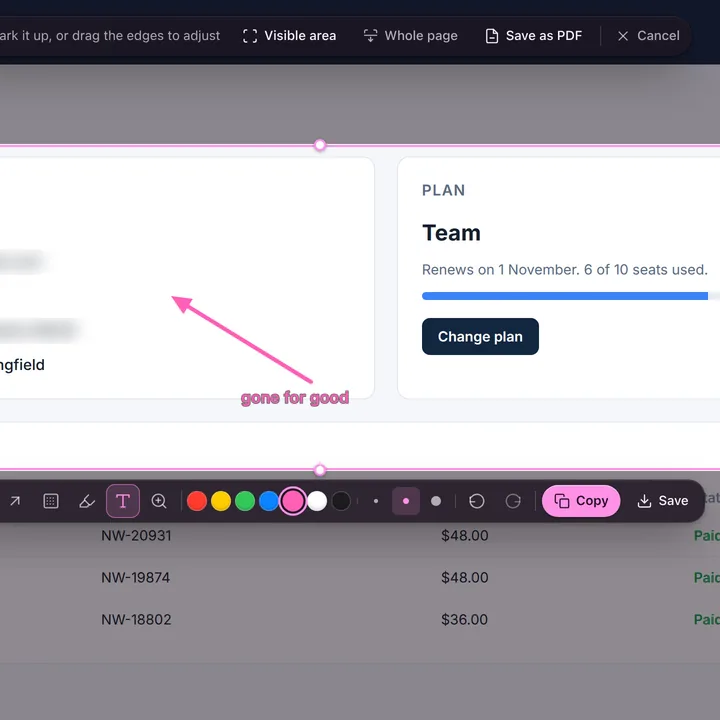
  • NhakoCapture's toolbar over a frozen page, with an arrow drawn on it
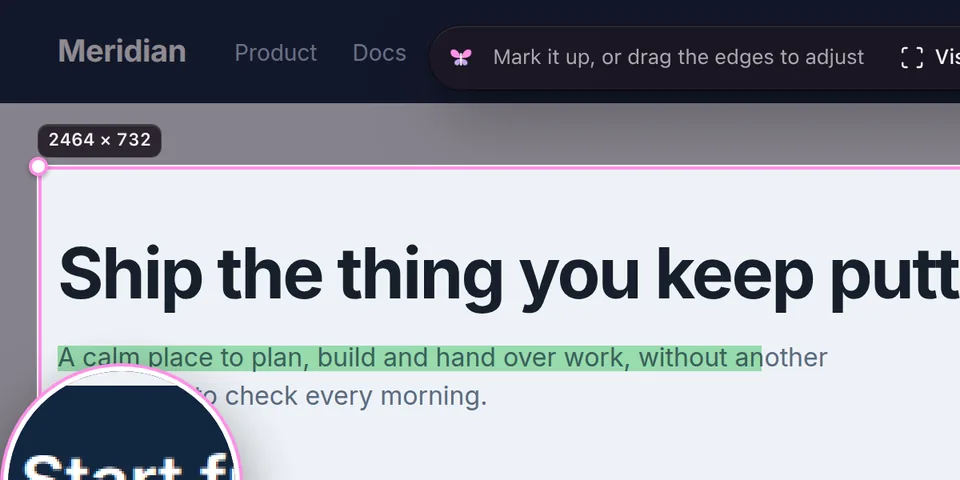
  • A page frozen by NhakoCapture with a region selected

LiveBrowser extension

NhakoCapture

github.com/kimzam30/NhakoCapture

Opera's one-keystroke screenshot, rebuilt for Chrome, Brave and Edge: freeze the page, frame a region, mark it up, copy. Free on the Chrome Web Store.

  • Real redaction: blurred pixels cannot be recovered
  • Whole page to PNG or PDF
  • No network calls, no telemetry
Version
2.2.0, on the Chrome Web Store
Runs in
Chrome, Brave, Edge, version 116 or newer (Manifest V3)
Permissions
No host permissions: activeTab, scripting, storage, downloads, offscreen
Build
None: the source you read is the code that runs
Tests
About 475 unit checks and 218 browser checks
Started
Last push
License
MIT

Full stack 6

Read the full write-up

Why it exists

Opera has a screenshot tool that is one keystroke and then out of your way: the page freezes, you drag a box, scribble an arrow on the thing you mean, and paste it into a chat. Brave has nothing equivalent, and the extensions that claim to fill the gap throw you into a new tab, make you save and reopen a file to annotate it, or want an account. A two-second reflex becomes a twelve-second errand. NhakoCapture rebuilds the reflex.

What it does

  • Frozen page: the viewport is captured before any UI appears, so the extension's own chrome can never end up in your screenshot.
  • Live framing: drag to select, eight resize handles, arrow-key nudge, and a live badge with the real output size.
  • Annotate in place: pen, arrow, blur, highlighter and text, in seven inks and three weights, with a magnifier for fine work and full undo.
  • Whole page: scroll-and-stitch to one PNG, with sticky headers shown once and lazy images woken first, or the whole document through your browser's print preview as a PDF.
  • Private by construction: no network calls, no accounts, no analytics, and no host permissions, so installing it never warns that it can read your data on every site.

How it works

Three decisions shape everything else.

  • Capture before you draw. The background worker screenshots the viewport before the overlay exists, which makes it structurally impossible for the extension's UI to appear in a capture.
  • Everything lives in a shadow root. No page stylesheet can reach the overlay, and none of its styles disturb the page.
  • Marks are records, not paint. The image is produced by replaying a list of operations over the bitmap, which is what makes undo work all the way back.

Install it

NhakoCapture is free on the Chrome Web Store, and the same listing installs it in Brave and Edge. Add it, pin the butterfly from the puzzle-piece menu, and press Ctrl Shift 5 (⌘ ⇧ 2 on a Mac).

To run it from the source instead, clone the repository, open chrome://extensions (or brave://extensions), turn on Developer mode, choose Load unpacked and select the folder with manifest.json.

ReleasedDirect file transfer

Nhako Beam

github.com/kimzam30/Nhako-beam

Send files straight between your own devices: Windows, Linux and Android. No cloud, no size limit, no account.

  • Same Wi-Fi finds itself; across the internet it goes direct, or through a relay that cannot read your files
  • Pair once with a four-word code or a QR code
  • A dropped connection picks up from the last confirmed byte
Stage
Version 1.0.0, the first full release. Windows installer not signed yet. No store releases yet.
Platforms
Windows 10 and 11, Linux (.deb), Android 8.0 or newer. No macOS or iOS.
Engine
Rust on iroh: QUIC with TLS 1.3 between device keys
Apps
Tauri 2 and Svelte 5 on desktop, Kotlin and Compose on Android
Started
Last push
License
MIT or Apache-2.0

Full stack 12

Read the full write-up

What it does

Nhako Beam moves files directly from one of your devices to another: a phone to a laptop, a desktop to a tablet. On the same Wi-Fi they find each other by themselves. Across the internet they connect directly when they can, and through a relay when they cannot. Either way the files are encrypted end to end and never stored anywhere in between.

  • No cloud: nothing is uploaded or kept on a server.
  • No size limit: only your disk decides.
  • No account: devices pair once with a four-word code or a QR code and remember each other.

What you can send, and how

  • Files, folders, text, links and your clipboard
  • Drag and drop, the Android share sheet, or right-click "Send with Nhako Beam"
  • Accept or decline each transfer, or auto-accept from devices you trust
  • Pause, resume, cancel and retry, with BLAKE3 checks on what arrives
  • Share through a link to a browser on the same Wi-Fi
  • Android keeps going with the screen off; desktop lives in the tray

How it connects

Where you areWhat happens
Same Wi-FiDevices find each other with mDNS and connect directly
Across the internetHole punching makes a direct connection when the networks allow it
When direct failsA relay carries the encrypted stream and cannot read it. n0's free public relay by default, or your own in Docker

ReleasedLinux app manager

Nhako Depot

github.com/kimzam30/Nhako-Depot

See every app on your Linux computer in one place, keep them up to date and remove the ones you do not need. Made for people new to Linux.

  • Deb, RPM, Pacman, Snap, Flatpak, AppImage and hand installs, one card per app
  • Tick what to update and install it in one go
  • Shows exactly what goes before anything is removed
Stage
Version 0.4.0, released 27 October 2026. Debian-based systems are the most tested.
Needs
GTK 4.14 and libadwaita 1.5: Ubuntu 24.04, Zorin OS 18, Linux Mint 22, Debian 13, Fedora 40, Arch
Install
.deb and .rpm on x86_64, or from source
Built with
Rust, gtk4-rs, libadwaita, PackageKit over D-Bus
Started
Last push
License
GPL-3.0-or-later

Full stack 6

Read the full write-up

What it does

Linux software comes from many places: your distro's packages, Snap, Flatpak, downloaded archives, AppImages and more. Nhako Depot puts all of it in one window, tells you in plain language how each app was installed, and updates or removes it the right way, so you do not need to know which command to use.

  • One card per app: an app installed more than one way shows every copy, so you can keep just one.
  • Updates with tick boxes: untick what you want to skip and install the rest together.
  • Safe removal: it shows what will go first, and apps installed by hand go to the Trash so you can undo.
  • Clean up: finds broken launchers and Flatpak runtimes no app uses any more.

What it can see

WhereSources
Main viewDeb, RPM, Pacman (including AUR builds), Snap, Flatpak, AppImage and Manual installs
Under AdvancedPrograms from cargo, npm, pipx, Homebrew and Nix, removed with each tool's own command

Privacy

No accounts, no ads, no analytics and no tracking. It uses the internet only for updates, through your system's own tools. To find AppImages it reads file names in a few folders in your home directory.

Self-hostTelegram assistant

Nhako Bot

github.com/kimzam30/Nhako-Bot

A private Telegram assistant that runs entirely on your own hardware: a small local model, offline voice notes and a memory file you own.

  • A small local model through Ollama that understands English and Malay
  • Calendar, reminders, Notion tasks, web search and homelab alerts
  • Anything that changes your data asks you to confirm first
Model
qwen3.5:2b through Ollama, on your own GPU
Memory
One SQLite file, saved only when you ask
Speech
faster-whisper on the CPU, offline
Runs as
Python 3.12 in Docker Compose
Started
Last push
License
MIT

Full stack 10

Read the full write-up

What it does

CapabilityHow
CalendarGoogle Calendar from plain language. Moves and deletes show Confirm and Cancel first
Reminders and agendaReminders that survive restarts, a morning agenda and a weekly review
NotionTasks and projects; every change asks first
WebDuckDuckGo plus page reading, summarised with source links
HomelabDocker health through a read-only socket proxy, Minecraft status, and alerts when something goes down
Social draftsSaves Postiz drafts after you confirm. It never publishes
Voice notesAny of the above, spoken, transcribed offline

How it works

Each message is routed to one category, the model picks a tool from that category only, and code runs it: dates, API calls and matching are never left to the model. Commands such as /today and /tasks answer instantly and work even while the model is down. Nothing is sent to a hosted AI provider.

RunningHome server, 19 containers

Homelab26

github.com/kimzam30/Homelab26

One Windows box running 19 containers across 9 Compose projects, with two front doors that never touch: one public, one private.

  • Private services reachable only over Tailscale
  • A public Minecraft server with 138 mods
  • Four backup layers that assume the Docker disk is lost
Host
Windows 11, Docker Desktop on the WSL2 backend
Scale
19 containers, 9 Compose projects, 5 Docker networks
Private
Nextcloud, Vaultwarden, Portainer, Homepage, PairDrop
Public
A Fabric Minecraft server and its Next.js website
Started
Last push
License
Not specified in the repo

Full stack 14

Read the full write-up

Four jobs, kept apart

  • Private services for one household: files, passwords, a dashboard and ad-hoc file transfer, reachable only over a Tailscale tailnet.
  • A public Minecraft server with 138 mods, open to the internet on one port.
  • A public website for that server, on its own reverse proxy with no route to anything private.
  • A four-layer backup system that assumes the Docker disk image can be lost entirely.

Two front doors

The single most important fact about the system: the public path and the private path never touch. Players and website visitors come in through one proxy; your own devices come in through another, on the tailnet. No process on the public path has a network route to any process on the private one.

That is enforced by separate Docker networks and separate bind addresses, not by an access list that somebody has to keep correct. For the same reason there is no top-level compose file: restarting the website must never be able to restart the game server.

What is written down

Nine documents cover the whole machine: architecture and trust boundaries, storage across four drives (random I/O on the SSD, bulk data on the HDD), every network and port, backup retention and restore runbooks, security decisions and their reasoning, day-to-day operations, the Minecraft stack's JVM tuning, the web platform, and the three scheduled tasks that live outside Docker. The original build logs are kept too, because they hold the measurements behind settings that would otherwise look arbitrary.

Earlier buildThe first home server

My HomeLab Setup

github.com/kimzam30/my-homelab-setup

The first homelab: a NAS, Pi-hole, Jellyfin, Gitea and uptime monitoring behind Tailscale, all in Docker Compose.

Services
Homepage, FileBrowser, Jellyfin, Gitea, Pi-hole, Speedtest Tracker, Uptime Kuma
Access
Tailscale, behind an Nginx reverse proxy
Approach
Infrastructure as code; secrets in environment files
Started
Last push
License
MIT

Full stack 10

Read the full write-up

What ran on it

  • FileBrowser turned the server into a NAS you manage from any browser.
  • Jellyfin streamed the local media library to phones, tablets and the TV.
  • Gitea hosted private repositories.
  • Pi-hole blocked ads and trackers for the whole network at DNS.
  • Speedtest Tracker and Uptime Kuma logged the ISP hourly and raised alerts when a service or the tunnel went down.

What came next

It replaced several paid subscriptions with self-hosted software. Its successor, Homelab26, rebuilt the idea around a hard split between public and private services and a backup system designed for losing the whole disk.

ReferenceA browser IDE in a container

Remote Dev Setup

github.com/kimzam30/Remote-Dev-Setup

VS Code Server in Docker with Python and C++ toolchains, NAS project mounts and Tailscale access, so any device can write code.

IDE
code-server (VS Code in the browser)
Toolchain
Python 3 and pip, gcc, g++, gdb, make, Git
Storage
Bind mounts to the projects on the NAS
Started
Last push
License
MIT

Full stack 9

Read the full write-up

Why it exists

Instead of installing compilers on every laptop or tablet, one container carries the whole environment. The same GCC and the same Python libraries everywhere; code from an iPad or a library computer; and the source stays on the NAS, never synced to a device you might lose.

How it is reached

The container runs on the home server and is reached over Tailscale, a private mesh VPN, so there are no ports open on the router. Extensions and settings persist on the host, so they survive container restarts.

ReferenceWorkstation notes

My Linux Setup

github.com/kimzam30/my-linux-setup

Zorin OS on a Dell XPS 15: the hardware fixes that were not obvious, TLP power tuning, and a remote workflow over Tailscale.

Machine
Dell XPS 15 9500, Intel Core i7-10750H
OS
Zorin OS 17, Wayland session
Used for
Python and C++ coursework, remote development
Started
Last push
License
MIT

Full stack 9

Read the full write-up

Fixes worth writing down

  • Opera crashing Wayland: sidebar auto-hide broke the window manager; forcing the X11 backend fixed it.
  • Grainy webcam: auto-exposure off and the power line frequency set to 50 Hz, Malaysia's mains frequency. At 60 Hz the video bands.
  • HEIC thumbnails: iPhone photos preview in Nautilus, including on NAS storage over Tailscale.
  • Battery: TLP, aggressive on battery and full speed on AC.

The remote workflow

The laptop, a gaming desktop and the NAS share one tailnet, with no port forwarding. The always-on NAS wakes the desktop over the network. Games and the desktop stream to the laptop with Sunshine and Moonlight at 1080p and 60 fps, usable over campus Wi-Fi, and heavy builds run on the server over Remote-SSH so the laptop stays cool.

TemplateA letter in one HTML file

Project Nera

github.com/kimzam30/Project-Nera

A personal letter delivered as a retro terminal session: typewriter text, music, and a timed image reveal, in one HTML file.

Size
One index.html: markup, styles and logic, no build step
Look
Phosphor-green monospace on black
Media
Yours, and gitignored so a fork never exposes it
Started
Last push
License
MIT

Full stack 4

Read the full write-up

What it is

A template: clone it, swap the words and the media, send the link. Text types out character by character, a background track fades in once the reader interacts (browsers block autoplay until then), and after two passages an image is revealed with a heartbeat animation.

Use it

Add a song.mp3 and a us.jpg, edit the two message arrays and the closing line, and tune the delays to your track. Because the media is gitignored, deploy the local folder (Netlify Drop, or npx vercel --prod) rather than connecting the repository, or the letter goes out without its song and picture.

NotesWorked examples

Study C++ in 7 Days

github.com/kimzam30/Study-Cplusplus-in-7-days

A self-directed sprint through C++ fundamentals, pointers to stacks, one topic a day, each a small program that compiles.

Language
C++17, compiled with g++ -Wall -Wextra
For
Object-oriented programming and data structures coursework
Started
Last push
License
Not specified in the repo

Full stack 4

Read the full write-up

The days

DayTopic
1Pointers, and passing by value, reference and pointer
2Encapsulation and abstraction
3Inheritance, virtual functions and dynamic dispatch
4Arrays, structs and hand-built containers
5Linked lists: insertion, deletion, traversal
6Stacks, backed by arrays and by lists

Why it exists

The goal was working code for each concept rather than notes about it. The examples are deliberately small and self-contained, so each one can be read and run on its own.

How it grew

Every public project, in the order it was started.

  1. Remote Dev SetupReference
  2. Butterfly Word SearchSuperseded
  3. My Linux SetupReference
  4. Project NeraTemplate
  5. My HomeLab SetupEarlier build
  6. NhakoSearchLive
  7. Nhako ToolsLive
  8. Nhako BotSelf-host
  9. NhakoCaptureLive
  10. Study C++ in 7 DaysNotes
  11. Nhako BeamReleased
  12. Homelab26Running
  13. Nhako DepotReleased

Start a project

Tell us what you need, your timeline and your budget. We reply with questions or a written quotation.

Nhako apps

Our own products, free to use. Each opens in a new tab.

Every project